How to Import Files?#
Documents uploaded to the interface (your corpus) are shown on the right-hand side of the screen. Documents that you mark as favourites ( ) are also shown in the drop-down menu.

Note: When you import an existing project (see How to Manage Your Projects?), the documents it includes are loaded at the same time.
To import documents, use the appropriate buttons in the Documents tab or the drop-down menu. From the file explorer window, you may select several documents by using Ctrl + click or Shift + click.
Recognized file formats: .pdf,.docx, .odt, .txt, .md, .html, .rtfand all other formats supported by the e-book conversion tool Calibre.
Tip: Depending on your preferences, when loading a document, the text can be aligned to the left (default) or the right.
Collections#
Similar to a system of folders and subfolders on your desktop computer, you can create collections and subcollections of documents in LibreQDA.
This is useful when you have a large number of documents that can be grouped together based on a classification logic, for example by media outlet (La Presse, Radio-Canada, Le Devoir, Le Nouvelliste, etc.), by interviewee, by country, etc.
A document cannot belong to more than one collection.

File readability#
LibreQDA can import a wide variety of file formats using the Calibre tool, which runs behind the scenes. This comes at the cost of stylistic fidelity. Most visual reading aids are lost, such as section headings, margins, tables and font colour.
To help you regain some readability, you can use the following formatting tags:
- Bold
- section headings
- repeated special characters (for example =============)
You can also import your files in Markdown format. For example, the screenshot below shows that it's possible to reproduce the indentation typical of posts and comment threads on some social media.
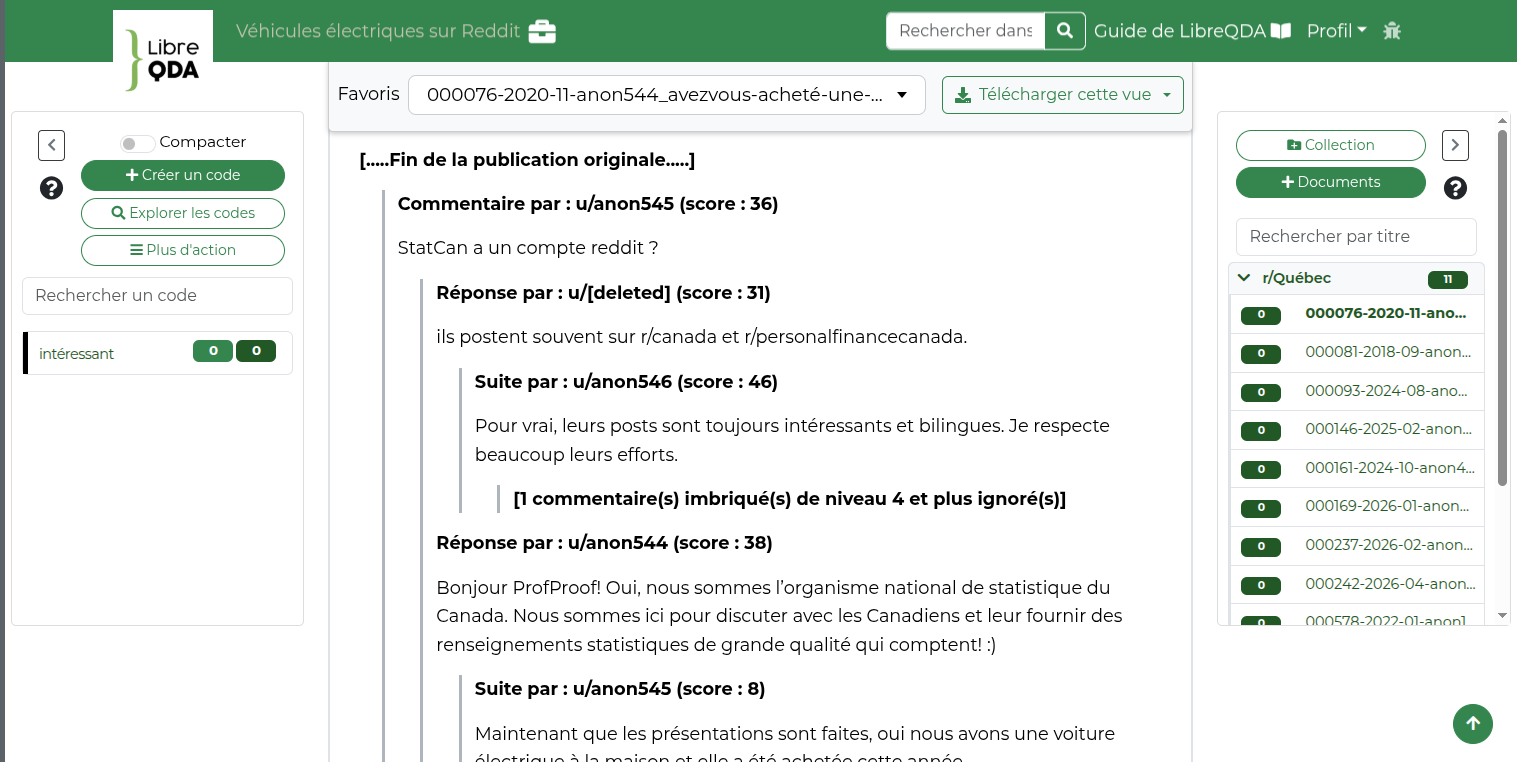
The original file loaded into LibreQDA uses the special character >, which is converted into an indent of a few centimetres to the left.